| Main page Graphics Photography Music & Audio Audio Plugins Video Tools Web Design Documents Space Astro Amiga Funny Surreal Gallery Links & Contact |
Configuration TipsThese are largely my own personal notes on how to configure the GUI to be less annoying, less bloated and first of all more responsive. I just made them public in case anyone else happened to share my opinion on settings. Firefox
Chrome & Opera
UTF-8 in irssi/screen/putty
UTF-8 in MySQL under FreeBSDMake sure you do this before anyone starts using the database.Add or edit the file "/var/db/mysql/my.cnf" so that you have this: [mysqld] init_connect=’SET collation_connection = utf8_general_ci’ init_connect=’SET NAMES utf8’ default-character-set=utf8 character-set-server=utf8 collation-server=utf8_general_ci skip-character-set-client-handshake SamplitudeGo to the dedicated page for more info.EditPlus and PHPIn order to make EditPlus save files compatible with PHP while doing web pages in UTF-8 format, you have to disable the "byte order mark" that some UTF-8 text files have, because PHP doesn't understand these. Also you might as well always use "unix linefeeds" as the CR character is obsolete. (Notepad.exe is the only application that needs them)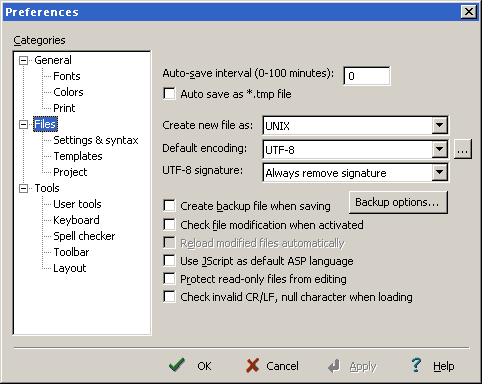 Windows TricksPut a JPEG image here: C:\Windows\System32\oobe\info\backgrounds\backgrounddefault.jpg and then run this .reg file to activate it. (Disclaimer: This works for Windows 7 with jpeg images, but I do not know how risky this is, so do this at your own risk.)Website by Joachim Michaelis
|