| Main page Graphics Photography Music & Audio Audio Plugins Video Tools Web Design Documents Space Astro Amiga Funny Surreal Gallery Links & Contact |
The (more or less) forgotten Amiga technologiesThe Amiga is the cat of computing. The bird Phoenix. The zombie that refuses to stay in the grave. It seems to have lived multiple lives and died multiple deaths. And each time, it has been taking a lot of unique design ideas and technologies with it into the grave. On this page I shall attempt to describe some of the things I miss, hoping that some day, someone will pick it up and carry on where the Amiga left. I may also describe things that did survive, but are now so rare that I think they need to be exposed further. ARexx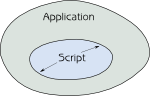 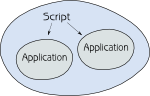
DatatypesEvery single application should not need to have an import/export filter (loader/saver) for every single fileformat on earth. This should simply be a part of the operating system, as it was on the Amiga. This way new file formats will be accessible to all applications - even old ones - as soon as the proper Datatypes module is installed. Example: Once you've added a PNG Datatypes loader, all graphics applications, browsers etc. will then support PNG.Wide use of the IFF formatA vast majority of Amiga software reads and writes IFF files. IFF resembles XML files, but is binary and thus less prone to encoding and spelling mistakes. It also uses much less space. IFF files are typically both forwards and backwards compatible, that is, new software can read old files and vice versa. To identify any IFF file, you only need to read the first 12 bytes of the file. Before the PC had noticeable graphics abilities, all graphics software on the Amiga used the IFF ILBM format. This way you never had to deal with conversions, as all software used the same format. More.File type detectionThe Amiga looks at the file header when deciding what filetype something is. So even if you loose the file extension, or don't even have file extensions, everything still works perfectly.Separate control over window focus and z-orderThat's right, just because you click a window, it is not automatically put in front of other windows. There were separate buttons for that. Now this may sound like you'll have to spend a lot of extra time clicking in order to bring the right windows in front of each other, but having used this GUI for over 10 years, I sincerely believe that being in direct control over what is in front yourself, is actually faster than not being in control of window placement. My favorite example is this: Imagine using a text editor in fullscreen, and then you need to calculate several values for the document at hand, so you bring up a little calculator. Upon clicking the document to type in the resulting value, the calculator now dissappears behind the text editor. This happens every time you click the text to type in the result you calculated, and you'll constantly need to bring the calculator back in front for each time you need it. On Windows, some applications may present you with the option "Always on top", which is obviously a feature designed to overcome the above problem. I find this approach less than optimal compared to never having these issues to begin with. On some Unix window managers, there is a feature called "focus follows mouse" which also addresses and solves this problem, but you suddenly have to pay too much attention to the placement of the mouse despite not even clicking the buttons, which I find equally troublesome to use. I still to this day prefer the Amiga solution, even though I've had over 10 years to get used to Windows' way of doing this. Now I'm well aware this is also a matter of taste, but because no current operating system / window manager (except KDE) currently offers this, I find that many people are missing a chance to try something I find very efficient. And at least this yet another example of the Amiga not just copying other companies, but rather, it boldly rethinks fundamental usability concepts.Modal dialogs aren't lockedIf you have a Windows machine, try this: Open notepad. Press Ctrl-O to bring up the file dialog. Notice that while it is open, the main notepad window is completely frozen. You cannot move or resize it. Non-windows users who are trying to move the underlying window (for example to reveal other windows behind it) would think this is a malfunction. This is called a "modal dialog", and is a design limitation that occurs because resizing and moving a window requires the attention of the application itself. On the amiga, resizing and moving a window is handled by the operating system. This is why you are never troubled by these "frozen windows" on the amiga.Multiple assignsThis feature originates from VMS. Even though all aspects of this was never entirely well implemented on the Amiga, it allowed you to assign (create) a virtual device name (something that resembles a drive letter on a PC) that points to several destination folders. The somewhat similar feature called "Linked Folders" in Windows is less elegant, as it just shows the list of destination folders. In Unix you can achieve something similar using softlinks, but it can be troublesome administrating this, and it's less dynamic than Multiple Assigns.HAM - Hold And ModifyPerhaps not entirely as usable today, this technology still is somewhat fascinating as it allowed 4096 colors using only 6 bits per pixel, 262144 colors using 8 bits per pixel and, in theory, full truecolor 16777216 colors using only 10 bits per pixel. Decoding this format is extremely fast if you scan the file from left to right, top down.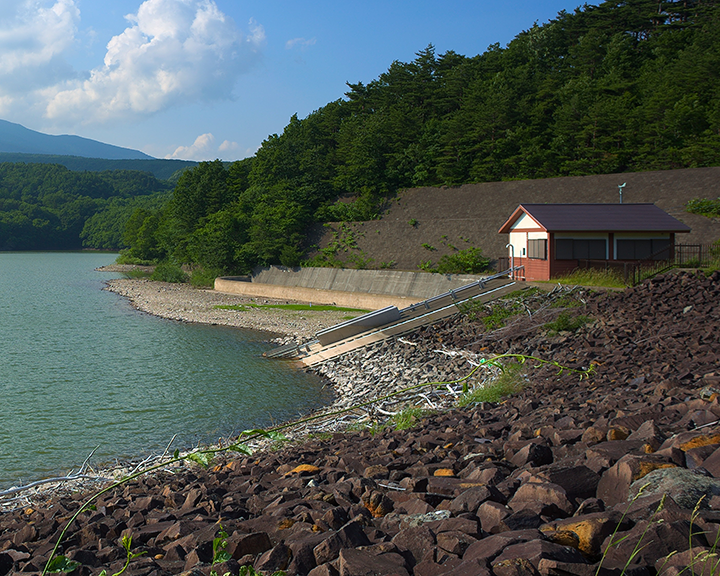 Original image, 24-bit truecolor 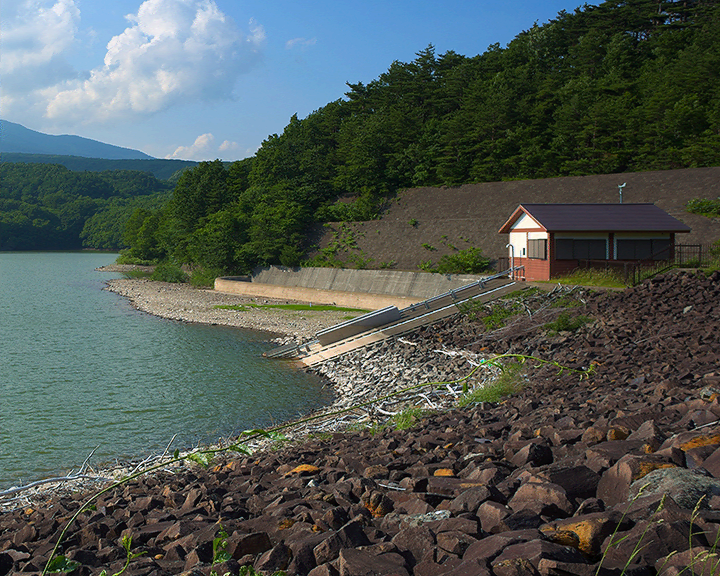 HAM-8 (8 bits per pixel) as seen on an Amiga 1200 or 4000  HAM-6 (6 bits per pixel) as seen in slightly flickering interlace on an Amiga 500, 600, 2000 or 3000. The last image shows the maximum possible graphical quality that could be displayed on an Amiga in 1985. Maximum resolution back then was appx. 720 x 576 (PAL). This was only a year after EGA and just two years before the introduction of VGA (which was still only 256 colors at 640x480.) US + Western Europe keyboardPerhaps less of a detail, but still a bit clever: The Amiga had the entire iso-8859-1 character set mapped onto it's standard US layout. Of course you could change the keyboard layout like on any other modern OS, but if you left it at US, it was still quite easy to reach german, swedish, danish, spanish and french letters, without having to type in ascii codes or hurt your fingers. Great for western europe, but of course less optimal for the rest of the world. They keyboard also had a "Help" key, which, in hindsight seems like quite a good idea considering how most Windows-programs today use F1 for "help".More hotkeys with no qualifier keyMost hotkeys today are a combination of some sort of qualifier key (Ctrl on windows/linux, Command on mac) and a letter. On the amiga it appeared to be more common to use hotkeys with no qualifier key. E.g. "undo" was simply U which is both more logic and easier to hit than Ctrl-Z. Excessive use of hotkeys can be devastating to ergonomics. Try hitting Ctrl-Shift-B for example. That's probably not a hotkey a developer should pick for a very common operation.This section needs to be improved
ScreensThis concept has always been close to impossible for me to convey properly to non-Amiga users. Anyone, who's been using a PC or Mac with two or more monitors hooked up, should know the feeling: You spend less time switching between windows than when using just one monitor. It's nice. And "screens" are a very successful alternative to having more than one monitor. Now, most of you may think that this is just the same as using "virtual desktops", but for reasons that are still hard to explain, I don't think it's anywhere near the same thing. Multiple desktops feel more like staying on the same screen, but swapping around what windows are visible and which are not, whereas using screens feel much more like having multiple physical monitors connected. These screens can even be in different resolutions.
Found an error or a mistake? Let me know so that I can fix it: joachip at gmail dot com
Website by Joachim Michaelis
|